SQL INNER JOIN
SQL INNER JOIN
INNER JOIN 关键字选择两个表中都有匹配值的记录。
提示:您可以直接使用 JOIN 代替 INNER JOIN,因为 INNER 是默认的连接类型。
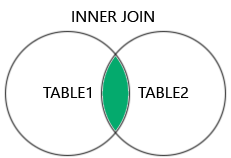
INNER JOIN 语法
SELECT column_name(s)
FROM table1
INNER JOIN table2
ON table1.column_name = table2.column_name;
INNER JOIN 示例
请看 Products 表中的某款产品:
| ProductID | ProductName | CategoryID | Price |
|---|---|---|---|
| 3 | Aniseed Syrup | 2 | 10.00 |
然后请看 Categories 表中的某行:
| CategoryID | CategoryName | Description |
|---|---|---|
| 2 | Condiments | Sweet and savory sauces, relishes, spreads, and seasonings |
这里我们看到上述两个表之间的关系是 "CategoryID" 列。
现在我们通过 CategoryID 字段在 "Products" 表和 "Categories" 表上创建 INNER JOIN:
实例
使用 INNER JOIN 关键字连接 Products 和 Categories:
SELECT ProductID, ProductName, CategoryName
FROM Products
INNER JOIN Categories ON Products.CategoryID = Categories.CategoryID;
注意:INNER JOIN 仅返回在两个表中都有匹配的行。这意味着,如果有一个产品没有 CategoryID,或者其 CategoryID 在 Categories 表中不存在,则该行将不会出现在结果中。
命名列
在 SQL 连接中指定列时,包含表名是一个好习惯。
实例
在列名前添加表名:
SELECT Products.ProductID, Products.ProductName, Categories.CategoryName
FROM Products
INNER JOIN Categories ON Products.CategoryID = Categories.CategoryID;
上面的例子在没有指定表名的情况下也可以工作,因为指定的列名中没有同时出现在两个表中的列。但是,如果您在 SELECT 语句中添加 CategoryID 列,并且不指定表名,则会发生错误。这是因为 CategoryID 列同时存在于两个表中。
JOIN 或 INNER JOIN
JOIN 和 INNER JOIN 将返回相同的结果。
INNER 是 JOIN 的默认连接类型,所以当您写 JOIN 时,解析器实际上会将其写为 INNER JOIN。
实例
JOIN 等同于 INNER JOIN:
SELECT Products.ProductID, Products.ProductName, Categories.CategoryName
FROM Products
JOIN Categories ON Products.CategoryID = Categories.CategoryID;
连接多个表
您可以在查询中添加多个 INNER JOIN 子句来连接两个以上的表。
以下 SQL 语句选择所有带有客户和发货人信息的订单:
实例
SELECT Orders.OrderID, Customers.CustomerName, Shippers.ShipperName
FROM Orders
INNER JOIN Customers ON Orders.CustomerID = Customers.CustomerID
INNER JOIN Shippers ON Orders.ShipperID = Shippers.ShipperID;
以下是 Shippers 表:
| ShipperID | ShipperName | Phone |
|---|---|---|
| 1 | Speedy Express | (503) 555-9831 |
| 2 | United Package | (503) 555-3199 |
| 3 | Federal Shipping | (503) 555-9931 |